Showing posts with label Adam Del Toro. Show all posts

25 July 2012

Estimating the Canopy Fraction in your IRR Field of View

A common problem many individuals face when making canopy temperature measurements with an infrared radiometer (IRR) involves estimating the fraction of the field of view that is occupied by canopy (leaves and stems) and soil. This is important in many settings, because plants do not completely cover the ground and the resulting IRR temperature measurement will be a weighted average of canopy components and soil in the IRR field of view. Estimation of field of view occupied by canopy is particularly important early in the growing season when crops are small and a large fraction of soil is viewed. However, knowledge of field of view composition is important in any application where a uniform surface is not being measured due to different surface components. In this case, canopy and soil will typically have different temperatures. The equation to approximate the fraction of IRR field of view occupied by the canopy (fc) is dependent on plant leaf area and is based on the equation to calculate the canopy extinction coefficient for direct beam radiation [1] and is given as:
where LAI is the leaf area index, and K is the extinction coefficient. K is dependent on two additional variables: the leaf angle distribution parameter (X) and the viewing angle (θ) of the IRR (relative to nadir view = 0°), which is chosen by the user. These variables will be described briefly below. For more help planning the viewing angle of your IRR, click here.

Leaf Area Index (LAI): area of leaves per unit area of ground [m2 m-2], which can be expressed as total leaf area or one-sided leaf area. One-sided leaf area (projected area) is half of the total leaf area and is often called hemi-surface area. LAI is typically reported as hemi-surface area per unit ground area, unless the canopy is largely made up of needle-leaf species. In cases where LAI is not directly measured, it is often approximated from canopy height. A few examples from scientific literature are given in the table below.

Crop LAI Equation (where h is in meters)
Clipped Grass [2] = 24 * h
Alfalfa [2] = 5.5 + 1.5 * ln(h)
Corn [3] = exp(1.64 * ln(1.41 * h))
Soybean [3] = exp(2.38 * ln(4.17 * h))

Extinction Coefficient (K): area of shadow cast on a horizontal surface by the canopy divided by the area of leaves in the canopy, or in other words, the average projection of leaves onto a horizontal surface. The following equation can be used to approximate K:


where X is the leaf angle distribution parameter, and θ is the IRR viewing angle [4].

Leaf Angle Distribution Parameter (X): ratio of average projected area of canopy elements on a horizontal surface to projected area on a vertical surface. X defines the distribution of leaf inclination angles in a plant canopy from 0 (horizontal) to 90 degrees (vertical). For plant canopies with more horizontally-oriented leaves, X is greater than one, and for plant canopies with more vertically-oriented leaves, X is less than one. X = 1 is a good approximation for many plant canopies because leaf area is distributed fairly uniformly among all leaf inclination angles. The figure below shows the inclination angle density for three canopies [4]. The larger X, the more horizontal the leaves are. The equation for these distributions is given by Campbell [5].

Additionally, X values for various crops have been estimated as shown in the table below [4].

Crop X Crop X
Ryegrass 0.67-2.47 Cucumber 2.17
Maize 0.76-2.52 Tobacco 1.29-2.22
Rye 0.8-1.27 Potato 1.70-2.47
Wheat 0.96 Horse Bean 1.81-2.17
Barley 1.20 Sunflower 1.81-4.1
Timothy 1.13 White clover 2.47-3.26
Sorghum 1.43 Strawberry 3.03
Lucerne 1.54 Soybean 0.81
Hybrid swede 1.29-1.81 Maize 1.37
Sugar beet 1.46-1.88 J. artichoke 2.16
Rape 1.92-2.13

A simple widget recently created in the IRR product section of the Apogee website can help make the necessary calculations to estimate the fraction of canopy viewed by an IRR. For more information, click here. If you have any questions or comments, feel free to respond to this blog post below.


Adam Del Toro
Mechanical Engineer 

[1] Campbell, G.S. (1986) Extinction coefficients for radiation in plant canopies calculated using an ellipsoidal inclination angle distribution. Agricultural and Forest Meteorology 36:317-321.

[2] Allen, R.G., et al. (2001) The ASCE Standardized Reference Evapotranspiration Equation. Pg B-6. http://www.kimberly.uidaho.edu/water/asceewri/appendix.pdf.

[3] M.C. Anderson, et al. (2004) Upscaling ground observations of vegetation water content, canopy height, and leaf area index during SMEX02 using aircraft and Landsat imagery. Remote Sensing of Environment 92:447-464.

[4] Campbell, G.S. and Norman, J.M. (1998) An Introduction to Environmental Biophysics, 2nd ed. pg 250-253.

5] Campbell, G.S. (1990) Derivation of an angle density function for canopies with ellipsoidal leaf angle distributions. Agricultural and Forest Meteorology 49:173-176.

30 May 2012

Uniformity, Repeatability, Stability, and Accuracy

Sensor manufacturers often provide information regarding uniformity, repeatability, stability, and accuracy on their specification sheets. But what do they really mean to you, the person making the measurement?

{Image from http://www.freedigitalphotos.net}
Uniformity is a type of systematic error that refers to the consistency of a measured value, either in a spatial distribution or compared to another sensor taking the same measurement. For example, a scientist seeking to know the uniformity of a large set of thermistors (same type and model) could take measurements of a circulating water bath held at a “constant” temperature. The manner in which the thermistors vary in comparison to one another would determine their uniformity.

Repeatability is similar to uniformity except that it deals with how consistent a particular sensor is against itself. It can be used to describe the ability of a sensor to provide the same result, under the same circumstances, over and over again. For instance, infrared radiometers (IRRs) manufactured by Apogee Instruments have a repeatability of 0.05°C (when within calibrated target and sensor body temperature ranges), denoting that measurements made under the same conditions should be within 0.05°C of the mean of those measurements. Repeatability is typically due to random noise, which is often outside of our control.

Stability deals with the degree to which sensor characteristics remain constant over time. Changes in stability, also known as drift, can be due to components aging, decrease in sensitivity of components, and/or a change in the signal to noise ratio, etc. Amplified pyranometers from Apogee Instruments illustrate this concept well with a stability of less than 3% per year. In other words, each year, under normal conditions, one can expect the sensor’s readings to change by less than 3%.

Accuracy, analogous to uncertainty relative to a reference, is in its simplest terms the difference between measured and “true” values. During calibration, measurements are compared to a reference, ISO or NIST traceable where available. Accuracy is determined by performing a general expanded uncertainty analysis, where all of the systematic and random uncertainties are combined using ISO uncertainty standards (which can be a discussion for a different day).

For each of the examples above, we must assume that a large sample size was used, and that the sensors used were chosen at random. Sensor specifications listed for uniformity, repeatability, stability, and accuracy from Apogee Instruments are based on a 95% level of confidence. This means that specifications listed for each sensor are guaranteed for at least 95% of all measurements taken and/or sensors used. Specification sheets for all of our sensors can be found in each of our product sections online. If you have any questions about this blog post, feel free to comment below.

Extra Resources:

Experimentation, Validation, and Uncertainty 
Analysis for Engineers
Third Edition
Coleman, H.W. and Steele, W.G.
John Wiley & Sons, Inc., 2009

Meteorological Measurement Systems 
Brock, F.V. and Richardson, S.J.
Oxford University Press, 2001


Adam Del Toro
Mechanical Engineer

11 April 2012

New Product: Horizontal FOV Infrared Radiometer (SI-1H1)

Apogee Instruments is pleased to announce the release of our horizontal field of view (FOV) infrared radiometer (IRR). Some of the features and uses are listed below.

SI-1H1

The SI-1H1 IRR is different from any other IRR that Apogee has manufactured in the past. It was designed with a unique rectangular FOV, intended specifically for far-field applications. Unlike previous IRRs, the SI-1H1 has two different half angles: 32° horizontal and 13° vertical; which will be described in more detail below. The sensor has an accuracy of ± 0.2 °C just as the SI-111 and SI-121 IRRs.


Field of View (FOV) 

Field of view (FOV) is typically reported as half-angle. Previously, all Apogee IRRs had an axisymmetric FOV, which depended on the model number. For example, the half angles for the SI-111, SI-121, and SI-131 are 22°, 18°, and 14°, respectively. As seen in the photo above, the SI-1H1 sensor has a rectangular aperture, creating an asymmetric FOV, with a horizontal 32° half angle for the lateral direction of the rectangular geometry and a vertical 13° half angle for the narrower dimension of the rectangular aperture. The figure below demonstrates these two different FOVs (full angle) from cross-sections of the SI-1H1 sensor.

Better Measurements 

The question arises: Why a rectangular slit instead of the usual circular aperture? When using an IRR, one must make sure that only the desired target is in the FOV, in order to make an accurate temperature measurement. For example, a problem some crop scientists face is accidentally having more than their crops in the FOV of the IRR. This could include the sky and/or other background objects (see figure below). Unfavorable images caught in the FOV of the IRR alter the desired temperature measurements and yield incorrect results. By adding a horizontal “filter”, the likelihood of capturing the background is dramatically reduced in certain applications. As expected, the aperture has baffles in order to deter reflected radiation from influencing measurements. Furthermore, the IRR can be mounted at greater angles of inclination from the ground. The SI-1H1 isn’t limited to cropped fields, since unique circumstances could require its use in many applications. In order to calculate the target area (based on the installation directions given below), please click here for a preconfigured Excel spreadsheet.


Installation in the Field 

With the horizontal aspect of this sensor, installation is critical and involves more than mounting the sensor at the correct inclination angle. We recommend the AM-210 Mounting Bracket which allows users to adjust the angle of the sensor with respect to the target area. The AM-210 accommodates the radiation shield designed for all Apogee infrared sensors.

Once the desired angle has been set, the sensor needs to be rotated along its main axis so that the rectangular portion of the sensor is aligned to the horizon. This orientation will minimize the likelihood of capturing sky or other background interference.

If you are not using the radiation shield or the AM-210 mounting bracket, the SI-1H1 has the standard mounting hole (¼ - 20), which is aligned with the horizontal aperture. If the sensor is installed against a completely flat vertical surface, using the mounting hole, the rectangular aperture will be aligned with the horizon.

Apogee is proud to offer another great product to our customers. We are continually focused on product innovation so you can “Make Better Measurements.” To learn more about the new SI-1H1 sensor or to place an order, click here.


Adam Del Toro

Mechanical Engineer

07 March 2012

Protecting Your IRR from Spiders

When making measurements and carrying out experiments, scientists tend to spend a great deal of time and care in selecting the right instruments, calculating uncertainty, and making sure conditions are acceptable. One of the last things on the minds of most people (and rightfully so) is that a pest, like a spider, could find a way to sabotage an experiment or measurement campaign. As spring approaches, many pests (including our 8-legged friends) will awaken in full force, ready to cause havoc. Don’t worry; they aren’t really out to get you! Spiders and other insects sometimes just see the aperture of an infrared radiometer (IRR) as their new comfortable home. There are some simple steps to prevent IRRs from looking like the photo below.

Spider webs can cause inaccurate readouts.


Important Steps to preventing sabotage by pests 

1. Check on your sensor often.
2. Sensor Placement.
3. Repellant.

How “often” depends on a couple of factors such as: what the sensor is measuring, whether it is outdoors or indoors, where the sensor is located, etc. For example, if you had an IRR sensor making measurements outdoors and in close proximity to thick shrubbery (spider magnet), you might want to reconsider the location of the IRR. If the location cannot be changed, I would recommend checking on it at least weekly. If your sensor is located high on a weather station, which you only visit once a month, it can be helpful to monitor and compare measurements from day to day if the data acquisition system allows. If you suspect something is wrong with readings, check the IRR next time you go out for a visit. Better safe than sorry.

Choosing and applying a repellant can be a little tricky. Some commercial repellants can be harmful to humans, due to their potency. They can also be corrosive, which can be detrimental to the longevity of an IRR. Another option is to use essential oils such as lavender, lime, lemon, orange, tea tree, etc., which naturally deter spiders and other pests while being non-toxic to humans. Whichever repellant you select, take all the safety precautions recommended on the container. To apply the repellent, use a cotton swab and carefully rub the repellant on the wall threads of the IRR aperture without touching the sensor window, as this can cause a change in readings. You may need to reapply the repellant occasionally.

If you are already having problems with other pests, like wasps, or anticipate it this spring, I recommend reading Seth Humphries’ blog from last month titled: “Minimizing problems with wasps on weather stations.”  

In the event you have an unwelcome visitor in an IRR, carefully brush it away with a cloth and carefully clean out any remaining spider webs with a wet cotton swab. While I don’t recommend keeping spiders as pets (unless you’re in Cambodia where cooked tarantula is a delicacy), I do recommend keeping them off your sensors, especially out of the aperture of an IRR.


Adam Del Toro

Mechanical Engineering Intern

25 January 2012

How to take IRR Temperature Measurements without a Datalogger

Customers occasionally ask us if it is possible to use our infrared radiometer (IRR) sensors without a programmable datalogger. This is difficult, but not impossible. This blog describes the requirements.

For starters, a voltmeter with microvolt accuracy is necessary since the target output of the sensor is only 30 to 60 microvolts per degree C. Dataloggers from Campbell Scientific have an accuracy of 0.33 microvolts, which is adequate to determine the temperature of the target to 0.01 C. Be careful not to confuse the resolution of the display with the fundamental accuracy of the voltmeter. Few voltmeters have the accuracy necessary to make a good measurement.

The voltage signal often needs filtering to improve the signal to noise ratio. The most typical filtering is 60 Hz integration, which filters out interference from nearby power sources. This may not be necessary in the middle of a field, but it is typically necessary in a laboratory environment.

After an accurate voltage measurement is made, it is necessary to convert the voltages from both the target sensor and the sensor body temperature into degrees C. This requires multiple steps. These steps are automatically done in a CSI datalogger, or done by downloading the program that comes with each sensor.


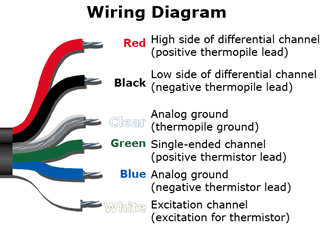
The first step is to convert the voltage output of the sensor body to temperature. This is measured with a precision thermistor and a precision bridge resistor. Set the multimeter to resistance mode with the resolution in the kΩ range. Next, place the leads onto the green and white cable ends of the IRR. Record and mark the measurement made as “RT”, in ohms.

The next, more complex step, is to convert the voltage output from the target sensor to degrees C. Make sure the resolution of your device is to the appropriate range, as typically all signal sizes of IRRs vary between -1.0 and 1.5 mV. Place the positive and negative leads from your multimeter onto the red and black wires, respectively, of the IRR cable (see figure above for IRR wiring help). Record and mark the measurement made as “mV” for future reference. Now that we have taken all of the necessary measurements for a surface temperature reading, we need to make a few calculations to convert RT to a sensor body temperature.


Campbell Scientific dataloggers use an intrinsic function called “Therm109” in datalogger programs to convert RT to a temperature in °C. However, this can still be done manually by using the Steinhart-Hart equation below:


  where A = 1.129241E-03, B = 2.341077E-04, and C = 8.775468E-08.

With the sensor body temperature (SBTempC) of the IRR calculated, we can finally proceed to incorporate the custom calibration coefficients for the final target temperature.


With every calibrated IRR sensor we sell, there is a set of custom coefficients which are needed to provide the user with the actual target temperature measurements desired. The custom coefficients are labeled mC2, mC1, mC0, bC2, bC1, and bC0 (as marked by the stars in the figure above). The equations below will show how these work. Two temporary variables, “m” and “b” which correlate with our calibration process, will be calculated as follows:


After calculating m and b, we take our mV measurement, and use our final equation below, to determine the IRR sensor target temperature in °C :


A couple of final comments: when taking measurements, ensure that your sensor remains in a stationary position, pointed at the target. Obstructing the sensor during measurement will cause incorrect readings, as well as holding onto the sensor body without the shield on, due to heat conduction effects. Additionally, taking the mV and RT measurements as concurrent as possible will provide optimal results. Provided below is a link to a starter excel spreadsheet that can be downloaded to help you take manual temperature measurements from your IRR. Simply fill in your custom calibration coefficients in the orange cells near the top and input your mV and RT measurements in the orange columns below, and you will have your desired target temperature in the green column. Happy measuring!


http://www.apogeeinstruments.com/files/IRR_Manual_Measurements.xlsx


Adam Del Toro
Mechanical Engineering

07 December 2011

Field of View

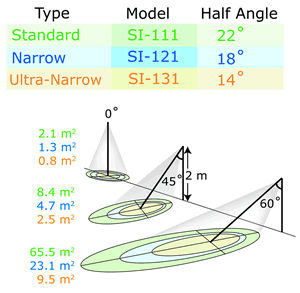
Due to recent product development, Apogee now offers three different options in choosing a Field-of-View (FOV ) for the SI-100 series infrared radiometers (IRRs). FOV is reported as the half-angle of the apex of the cone formed by the target (cone base) and the infrared radiometer detector (cone apex). It ultimately determines how much surface area your IRR can see at any given distance and tilt angle.

The target area is a circle from which 98 percent of the radiation viewed by the infrared radiometer detector is emitted. A center-weighted average of that target area is used to determine the mV signal. As the tilt angle is increased from zero degrees at a given height, the target area increases and transforms from being a circle to an ellipse as seen in the figure below.


We can also observe that as the tilt angle is increased to high values such as 60 degrees, the target area increases significantly. In addition, the difference between target areas of the three models can become quite contrasting. Those attempting to measure an accurate average of the target area in question, whether it be a plant canopy or a highway, must determine if the desired target area covers the desired destination appropriately. Measuring more or less of the desired area can result in questionable results. To help with this uncertainty, Apogee has developed a simple tool that can be accessed on our website:
http://www.apogeeinstruments.com/content/fov-calculations.xls


This simple spreadsheet and illustration above allows the user to input the tilt angle (“Angle from Normal to Surface”), the height above surface, and the FOV depending on which IRR model is in use, as seen in the green cells. The result is the approximated target area as seen in the highlighted yellow cell. It should be noted that only the green cells should be edited, as not to interfere with cell calculation formulas. Due to the conical nature of the FOV, high tilt angles above approximately 65°, 70°, and 75° for the SI-111, SI-121, and SI-131 models, respectively, can yield impractical results in the spreadsheet due to “viewing” a near-infinite surface area. Likewise, Apogee recommends mounting the sensors below such angles.

The FOV calculation spreadsheet can be used as a powerful tool in planning measurements such as deciding the model of sensor needed, an appropriate height and angle to mount your IRR, etc.

Apogee’s FOV calculation spreadsheet: helping you make better measurements.


Adam Del Toro
Mechanical Engineering

12 October 2011

Emissivity Correction

Temperature of an object is determined by three modes of heat transfer: conduction, convection, and radiation. While conduction and convection are generally easier to understand, radiation is often the most important mode of heat transfer. Understanding the underlying principles of radiation heat transfer helps to accurately measure surface temperatures at a distance with Apogee’s Infrared Radiometers (IRR). In this post I outline the essential principles in order to help you make better measurements.

Blackbody Radiation

All objects above 0 K (-273.15°C) emit radiation at the surface, due to the internal energy contained within the object. Radiation is continuously being emitted from surfaces and being absorbed, transmitted, and reflected. Some surfaces emit or absorb, for instance, better than others. This is mainly due to a surface condition called emissivity, which is determined by color, finish, and intrinsic material properties. Emissivity is a ratio of how well a surface performs as an emitter of infrared radiation in comparison to what is commonly called a blackbody, or ideal radiator. A blackbody is described as follows:

  1. A blackbody absorbs all incident radiation, regardless of wavelength and direction.
  2. For a prescribed temperature and wavelength, no surface can emit more energy than a blackbody.
  3. Although the radiation emitted by a blackbody is a function of wavelength and temperature, it is independent of direction. That is, the blackbody is a diffuse emitter [1].

Generally speaking, a blackbody is the perfect absorber and emitter. It is the standard we compare other radiating surfaces against. No other surface absorbs more energy or emits it than a blackbody. In addition, no radiation emitted from a blackbody is reflected from other sources.

According to the Stefan-Boltzmann Law, the emissive power of a blackbody is Eb=σT4, where
and the temperature is measured in Kelvin. Accordingly, for a non-blackbody, the emissive power is Eb=εσT4, where ε is the emissivity of the surface being considered (0<ε<1), and ε = 1 for a blackbody. The chart below shows emissivities for common materials. Additional values can be found at its source: http://www.engineeringtoolbox.com/emissivity-coefficients-d_447.html.
 
Although emissivities are not constant over all wavelengths, it is generally accepted practice to assume them constant due to the small amount of variation over the different wavelengths for most materials.

For plant scientists, it might also be interesting to consider the emissivities documented for various plant leaves and diverse vegetation over different wavelengths (http://g.icess.ucsb.edu/modis/EMIS/html/leaf.html).

Emissivity Correction

If emissivity isn’t taken into account, the surface temperature of an object may appear to be emitting more radiation, due to the addition of reflective radiation for instance, than it really is and thereby giving us an incorrect perception for the emissive power or temperature of that surface. This can be especially true for an IRR sensor that has been calibrated to a nearly standard blackbody surface. The calibration procedure for Apogee’s IRR sensors ( http://www.apogeeinstruments.com/content/SI-calibrationposter.pdf ) shows just that.

The question then is: how can I adapt for such a situation?

Appropriate correction for target emissivity is required for accurate surface temperature measurements. However, the simple correction that is commonly made, dividing the measured temperature by the target emissivity, is incorrect because it does not account for reflected radiation. The radiation detected by an infrared radiometer includes two components: 1) the radiation directly emitted by the target surface, and 2) reflected radiation from the background. The second component is often neglected. The ratio of the two components in the radiation detected by the radiometer is weighted according to the emissivity (ε) of the target surface:


Which after substitution of the Stefan-Boltzmann Law and rearranging, we get:

In order to apply the above equation however, we must measure or estimate with reasonable accuracy the brightness temperature of the background (Tbackground). For a more in-depth explanation of how to do so, please see: http://www.apogeeinstruments.com/content/SI-emissivitycorrection.pdf.

In any case, as the emissivity of what we are trying to measure moves further away from a blackbody, the more that emissivity error is introduced due to reflected radiation from surroundings. For example, the target temperature of a 25°C plant leaf on a sunny day could provide an error of -1.5°C, without emissivity correction [2]. That’s an error that most scientists can’t tolerate.

Conclusion

In almost all situations, having a precise IRR sensor, such as Apogee’s ±0.2°C accurate IRR sensors won’t be enough. Emissivity correction is required to minimize error in your data. Whether you are using it in on a plant canopy or monitoring icy road conditions, emissivity correction will help you make better measurements.

References

[1] “Fundamentals of Heat and Mass Transfer” Incropera, F.P., Dewitt, D.P., et. al. 6th Ed. 2007, pg 736.

[2] “A Review of the Physics for Emissivity Correction of Infrared Temperature Measurements” URL: http://www.apogeeinstruments.com/content/SI-emissivitycorrection.pdf.


Adam DelToro
Mechanical Engineering

24 August 2011

SI Radiation Shield

Air temperature is one of the most important environmental measurements and is the most commonly measured parameter on weather stations. Everyone who measures temperature in their yard can claim to have a basic home weather station.

The temperature of surfaces is considerably more challenging to measure accurately, but the temperature of plants, soils and road surfaces can tell us far more than just a simple measurement of air temperature. The Apogee Infrared Radiometer (IRR), measures surface temperatures by the infrared radiation emitted from them. The accuracy of this sensor is ± 0.2°C, but errors can arise when the sensor body is not shaded from direct solar radiation.

Errors
IRRs can more accurately measure the surface temperature of an object when the sensor body itself is close to the target temperature. The Apogee calibration process accounts for surface temperatures that are 15 C above or below the sensor body temperature. The rule of thumb, however, is that the measurements are more accurate when the sensor body is closer to the target temperature. The question then arises: how can I keep my IRR sensor closer to the target temperature?

Solution
Apogee recently developed a radiation shield that can be used with our IRR models. This shield keeps the temperature of the sensor closer to the target temperature. As a Mechanical Engineer, I was asked to take the lead in engineering the details of this shield. In order to ensure structural stability, performance, and minimize heat transfer to the IRR sensor, aluminum and nylon were chosen as the chief materials for the shield configuration. Relative to other metals like carbon steels, aluminum has a lower volumetric heat capacity (the ability to store thermal energy), and higher thermal conductivity (ability to conduct heat and thus maintain a uniform temperature across the aluminum). In addition, aluminum is lightweight and robust, thus allowing a smaller amount of material to be used in the wall thickness. Glossy white powder coating allows for a high albedo (more reflected radiation), thus minimizing the thermal radiation absorbed. Nylon screws and spacers are used to attach and suspend the IRR sensor within the shield. Nylon was chosen since it has a thermal conductivity approximately 1000 times less than aluminum, thus minimizing the conduction that occurs from the shield to the IRR sensor. When the IRR sensor is mounted in the aluminum shield, an annulus configuration is formed with approximately 6 mm (0.25”) spacing between the IRR sensor and shield. This spacing is sufficient to allow natural and forced convection to keep the sensor body as close as possible to the air temperature, and thus generally closer to the target temperature.

The shield extends 14 mm (0.5") beyond the front edge of the sensor base housing. This overhang helps to keep the front of the sensor in thermal equilibrium (at the same temperature) with the rest of the sensor body by shading it from direct sunlight. The overhang distance was carefully selected so it does not affect the field of view of the sensor.

Using the shield appropriately can result in lowering the sensor body temperature 3 to 10°C, giving you better measurements. Currently, the Apogee Radiation Shield, Model AI-100, ships with all newly purchased SI-100 & 200 series IRR sensors, or can be purchased separately as an upgrade to be used with any previously purchased IRR sensors for $39.

The Apogee Radiation Shield – engineered to help you make better measurements.


Adam Del Toro
Mechanical Engineering